About once every few months I have to set up a reverse tunnel.
I’ve learned the hard way to not read the man page, and just wing it.
After setting one up the other day I looked at the man page to see if it made sense whilst having a picture of its operating still in my mind.
*-R* [bind_address:]port:host:hostport

             Specifies that the given port on the remote (server) host is to be forwarded to the given host and port on the local side.
This works by allocating a socket to listen to port on the remote side, and whenever a connection is made to this port, the connec-tion is forwarded over the secure channel, and a connection is made to host port hostport from the local machine.
We all got that, right?
Break it down
OK, maybe I just wasn’t paying close enough attention, so I’m going to read it carefully and take notes while doing so:
The given port [which given port? port? or hostport?] on the remote (server) [hang on, which is the remote/server here? is it the ‘host’?] host [ok, so the remote/server is ‘host’ here? maybe? that would mean that host == server == remote?] is to be forwarded to the given hostand port on the local side [which port? same as previously mentioned port? does that mean the previously-mentioned port is the hostport? what’s the ‘local side’ here? local to where I ssh to? or local to where I run ssh?]
At this point I’m basically crying.
This works [so we presumably understand what’s going on by this point!] by allocating a socket to listen to port on the remote side [which is the remote side?], and whenever a connection is made to this port [ah, does this mean it’s the port on the machine I connect to (ie the ‘port’)?], the connection is forward over the secure channel, and a connection is made to host port hostport [wtf? ok, just ignore ‘host port’ there. I think we might be able to conclude that hostport is the port we are forwarding to, and the host is the host of the hostport] from the local machine [ok, now I think that the local machine is the machine we log onto. I hope that’s right].
Understand it Visually
A – Your ssh -R command connects to the ‘fromhost’. The ‘fromhost’ is the host from which you want to connect to the server.
B – Your ssh -R command connects to the server on the serverport
C – The port that was allocated on the ‘fromhost’ accepts tcp requests, and passes the data to the server:serverport via the intermediary host on which ssh -R was run.
I hope this helps someone.
Please tweet any corrections or comments to: @ianmiell
Seventeen months after signing the contract, I hold our book in my hands!
A lot of people have asked me about our experiences writing the book, whether it was ‘worth it’, how much work it was, whether I’d do it again, and should they do one.
I remember googling this before I started, so thought it would be good to pay forward my experiences for the benefit of others.
Why write a book?
It’s good to think about why you want to write a book before starting. Reasons include:
Vanity
Recognition
Money
Career development
Communicating your ideas
Learning about the technology!
None of these are good or bad reasons in themselves.
Vanity and recognition (seeing your name in print, being able to put ‘published author’ on your LinkedIn profile, being able to say ‘I’ve published a book on that’) can be a great motivator to keep going when things get tough, however shallow.
We all need money to live, but it’s no secret that writing a book will not make you rich. That doesn’t mean there aren’t material benefits though! You will get paid if it sells, but it’s not going to be enough in itself to make the hardship worthwhile, and will never be guaranteed. If you want money, market yourself as a consultant and make real money faster.
Secondary Benefits
The secondary benefits are where writing a book really excels. These can include:
Conference invites
Professional respect
Improved networking
Career enhancement
In a way, writing a book is like joining a professional club. The editor that persuaded me to write said ‘writing a book will put you into a different professional category’ and that has certainly been my experience.
Conferences can be fun, and you will come into contact with lots of people you would not normally meet. You can also validate your ideas while you write the book.
Learning
Whisper it, but writing a book will force you into corners of the technology you might not otherwise look into. In other words, you learn about it! I thought I knew a lot about Docker before I started, but writing a book forced me to up my game. Nothing focusses the mind like knowing that another ‘expert’ will be paid to go over your book with a fine-toothed comb and write brutal feedback!
As another secondary benefit, when you write a book, people ask you questions – a valuable way to gain intelligence about what’s going on in the field!
Communicating your ideas
A book is a great mouthpiece for you. You can take the time to give the benefits of your experience.
Publishers want to know this before taking you on as an author:
You know what you’re talking about
You have a strong idea what you want to write about
You are committed to completing the work
You are able and want to communicate
Have a table of contents prepared. Don’t worry if it’s not perfect, the fact that you have something will put you far ahead of the competition, and help convince the publisher you’re serious. They will help you improve it anyway.
This will change a lot as you write, but by knowing the shape of the book in advance – and knowing what you want to say – you will save a lot of time and effort.
I started by giving talks at meetups, which I highly recommend for all sorts of reasons, but having a video of me communicating to my peers ticked a lot of these boxes for my publisher.
A good publisher
Get a good publisher. It’s worth far more than a few percent more on the book’s sales.
A good publisher provides:
Planning, support and advice
Editing expertise and mentoring
Proof-reading iterations
Technical proofreading
Peer review
Marketing
Indexing
Illustration
Layout
Printing
Distribution
Branding
That’s quite a list! You can self-publish if you want, and you will make a bigger cut, but you will have to do a lot more work to sell each copy.
Manadatory Credit: Photo by Brian Rasic / Rex Features (396812dh) PRINCE VARIOUS
Maybe the time will come that I write ‘SLAVE’ on my face, but I can always self-publish at that point and save on marker pen ink.
In fact, I had a look at some self-published technical books in preparation for this article, and could very quickly see flaws not in contentbut definitely in copy, approach, style and design. All things the Manning team saved me from.
I have nothing but good things to say about the team at Manning, who had a very efficient team which supported and pushed us to make a better (and a better-selling) book. And we learned a lot about the publishing industry through writing it.
For example, about 20% of the writing time was spent getting the first chapter right. We went over it again and again until we’d learned the lessons we needed to. After that, the subsequent chapters came out pretty easily.
Time and space
It’s no surprise that writing book is time-consuming, but there are some subtleties beyond this to consider.
Simply taking 30 minutes every day to ‘work on the book’ is not enough. That will work for writing linking snippets or bits of proofing or testing, but will need stretches of many hours to do the real meat of the work. I would take myself off to the libraries for many stretches to focus on sections of the book that required real thought.
For example, I spent more time than I care to relate trying to get Kubernetes set up at home when it was still in its infancy. In retrospect this was a massive waste of time! But quite valuable in other ways – I learned a lot about the product, and even got into contact with the lead Kubernetes developer.
I was lucky in that I had two months between jobs, so I wrote and explored London, which was a fantastic life experience and a lot of fun. If I were to write a book again I would probably quit work and devote myself to it full-time. It’s less profitable, but getting the focus full-time would make life a lot easier and fun.
Get a co-author
I would seriously recommend getting a co-author. The benefits are numerous:
Sanity check on content and direction
50% of the work is taken off your hands
You still retain control where you want it
But not at any cost. I was lucky with my co-author – the work divided up nicely between us, and our skills complemented each other nicely. If you don’t trust someone, don’t sign up with them, as the process can get stressful if you let it.
I would have to think very carefully about going through this process again on my own.
Ability to write (and draw!)
Sounds obvious, but you will need to be able to write. I was lucky that I’d had some professional writing experience, but when you write in a commercial niche there’s more to learn about what works and what doesn’t.
If you can’t write already, be prepared to listen and learn. A good editor will give robust feedback, and tell you clearly where you need to improve.
And get good at doing diagrams. They don’t need to be polished, but diagrams are increasingly important in successful technical books.
When you see tweets like this it makes it all that effort worthwhile.
Ability to market
Although publishers provide marketing for you, you should be willing to work on this side of things as well. You should know what topics are of interest to people, and the marketing team will be very grateful if you feed them useful content.
Still want to do it?
Feel free to contact me if you want more advice or have any questions!
Following on from my earlier post on practising grep, this post shows two tutorials you can run on the command line to gain familiarity and get practice in with git bisect and rebase in a realistic and safe way.
They use Docker and ShutIt to help manage state in safe and lightweight way, while guiding you through the process.
If you haven’t seen it, this is a very accurate and smart Downfall satire on Docker’s ecosystem, technology, and culture.
It’s so good that I thought it would be instructive to annotate it so that the state of the art and some technical details of Docker could be better explained.
Tweet me @ianmiell if you spot a problem or want to suggest an improvement.
Annotated script
Henchman: We pushed the images to DockerHub, then used docker-compose to deploy to the cluster
Docker Hub is the public repository of Docker containers, analagous to GitHub.
docker-compose is a tool for managing multiple containers as a unit on a single machine. You’d more likely use docker-swarm to deploy to a cluster
Henchman: We mounted data volumes on these nodes, and linked the app container here. Finally we updated the dns records.
A data volume is the persistent store of data for containers.
Since containers are generally ephemeral, persistent data
is ‘mounted’ to containers on startup.
Hitler: So we’re running 20 containers on every node now. When can we get rid of the excess servers?
It is a promising aspect of Docker that it can reduce your
physical server footprint through ‘max-packing’ containers
on physical tin through reduced resource claims and not
needing to run multiple kernels (the so called ‘Hypervisor tax‘).
Henchman: Mein Fuerer, the kernel… A third party container caused a kernel panic.
Henchman: We’ve lost 70% of the cluster and the data volumes
Presumably the Kernel panic caused this loss.
Presumably also Hitler blames Docker users’ encouragement of free container downloading as the cause (see below).
Hitler: If you never used Docker in production, leave the room now
Figures are hard to come by, but Docker use in production
heavily lags development and test. This is to be expected,
since most new technologies bubble up through developers to
production.
Hitler: What were you thinking? Who the hell uses public containers from DockerHub? For all you know they were made by Russian hackers!
A convenient means of distributing software that effectively hands over control of your machine to the internet.
Hitler: You think anything in public repos is secure because it’s OSS? You’re a bunch of node.jshipsters that just HAVE to install everything you read on Hacker News!
Guilty (but not the node.js bit).
Henchman: But Docker allows us to run our application anywhere!
A paraphrase of Docker’s slogan. ‘Build, ship, and run any app anywhere.’
Hitler: You use a VM just to run Docker on your laptop!
Many users can’t run Docker directly on their machines,
for example if they use Windows or OSX. I use
Docker on an Ubuntu VM running on a Mac.
I’m not sure what Hitler would make of this.
Henchman: Main Fuerer, docker-machine uses a lightweight VM!
Hitler: Do you hear yourself? Why do we need docker if we’re running a VM? A container inside a container!!!
In this context, a VM can be used for isolation, so is considered a container also. A docker advocate would argue that the image is lightweight and easier
to deploy than a VM. Or as I like to say, Docker doesn’t
give you anything a VM can’t, but a computer gives you
nothing nothing an abacus can’t – user experience is key.
Hitler: You archived a whole Linux O/S then used CoW storage because it’s too big.
By ‘Linux O/S’ Hitler here means an operating system’s filesystem, which makes up most
of a Docker image. CoW (copy on write) storage is a feature of Docker where changes to the filesystem
are copied on write to make a new ‘layer‘ ready
for committing as a new image. Images are made
up of these layers, which can be shared between
containers, reducing disk usage. Hitler’s point here
is that the images contain a lot of data, which can be wasteful.
Hitler: Just so you can deploy a 10MB go binary!
Docker is written in Go, a fashionable language. One
of Go’s features is that it generates portable
binaries that can be run across different distributions
with little difficulty. Hitler is making the point that
if that Go binary is portable, why bother with Docker at all?
Hitler: Don’t even talk to me about resource constraints. All that cgroups magic and it still can’t stop a simple fork bomb!
Hitler: And if the database needs all the resources on the server how exactly will Docker allow you to run more programs on it!? Before Docker I just picked the right size VMs.
Docker is not magic. If you need the tin for your application, it won’t help you get more resources.
Hitler: Suddenly people talk to me about datacenter efficiency and “hyperconvergence”. Everybody thinks they’re Google!
Far too many organisations act like they are running at Google scale when they are not.
Hitler: You don’t even run your own machines anymore! People run on GCE, in VM instances that run in Linux containers on Borg!
Google Compute Engine is Google’s alternative to Amazon
Web Services. They run VMs within Linux containers that
themselves run Docker, which presumably Hitler thinks is laughable, but is there to provide greater levels of
security, and likely because Google is not short of
compute! Borg is Google’s cluster management
software, on which Kubernetes is based.
Hitler: People even think Docker is configuration management. They think Docker solves everything!
If Docker is anything, it’s package management.
You might use Dockerfiles for primitive configuration
management, but you can use traditional
CM tools like Chef and Puppet to provision your images.
Hitler: Even Microsoft has containers now. I’m moving everyone to Windows!
The Windows picture is quite complicated. You can: – Run Docker within a VM running on Windows (see above) – Run a Windows container (not widely available yet)
that implements the Docker API. This will talk to the Windows OS API (I assume) rather than the Linux Kernel API so the images built will not run across the systems. – Run bash in Windows natively. See below.
Henchwoman: Don’t cry, you can run bash on windows 10 now.
Hitler: Docker is supposed to have better performance yet that userland proxy is slower than a 28.8k modem and for what, just bind on port 0.
A userland proxy is one written in software and outside the kernel. In-kernel proxies are much faster.
Binding on port 0 gets any available port from the OS.
Docker does something similar by default. Docker performance is not better than natively-run software, but in some cases is arguably better than VMs.
Hitler: Even enterprises want to run Docker now and they still have Red Hat 5 installed.
This happens. RedHat is an enterprise-supported implementation of Linux. RedHat5 was released in 2007.
Hitler: You idiots that Docker will help your application scale.
It won’t. It can allow you to run more instances of your application, which is not the same thing.
Hitler: Use Openstack for all I care.
Openstack is an open-source cloud technology, which is powerful but costly to manage, and somewhat out of favour now.
Let’s say you have a server that has been lovingly hand-crafted that you want to containerize.
Figuring out exactly what software is required on there and what config files need adjustment would be quite a task, but fortunately blueprint exists as a solution to that.
What I’ve done here is automate that process down to a few simple steps. Here’s how it works:
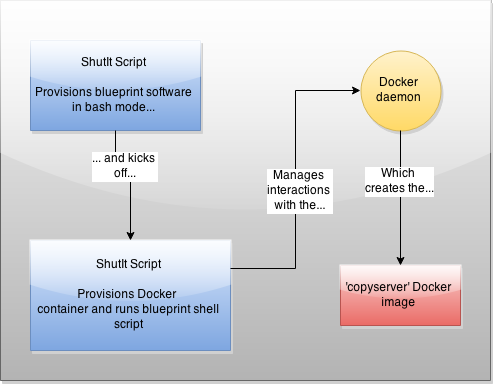
You kick off a ShutIt script (as root) that automates the bash interactions required to get a blueprint copy of your server, then this in turn kicks off another ShutIt script which creates a Docker container that provisions the container with the right stuff, then commits it. Got it? Don’t worry, it’s automated and only a few lines of bash.
There are therefore 3 main steps to getting into your container:
– Install ShutIt on the server
– Run the ‘copyserver’ ShutIt script
– Run your copyserver Docker image as a container
Step 1
Install ShutIt as root:
sudo su -
pip install shutit
The pre-requisites are python-pip, git and docker. The exact names of these in your package manager may vary slightly (eg docker-io or docker.io) depending on your distro.
You may need to make sure the docker server is running too, eg with ‘systemctl start docker’ or ‘service docker start’.
This article continues on from the previous twoposts outlining a method of provisioning Jenkins instances on demand programatically using docker-compose.
In this post we take this one step further by demonstrating how a Docker container can dynamically add itself as a client to the Jenkins server.
Overview
This updated diagram shows the architecture at part III
The ‘Jenkins-Swarm Docker Slave’ is new to this example. It is similar to the ‘Jenkins SSH Slave’ except that it connects itself to the Jenkins server as a slave running as a Docker container. Using this as a template you can dynamically add multiple clients to the Jenkins server under the ‘swarm’ tag.
Note: Do not confuse ‘Jenkins Swarm’ with ‘Docker Swarm’.
They are two different things: Jenkins Swarm allows clients to
dynamically attach themselves to a server and run jobs, while
Docker Swarm is a clustering solution for Docker servers.
New plugins
In addition, these new plugins have been added:
swarm – allow dynamic jenkins clients to be added via port 50000 backup – backs up configuration on demand (basic configuration set up by scripts) jenkinslint – gives advice on your jenkins setup build-timeout – allow a build timeout docker-build-publish – build and publish Docker projects to the Docker Hub greenballs – green balls for success, not blue!
This video demonstrates some of the highlights of the latest Docker version:
User namespacing setup and demo
In-memory filesystem creation
In-flight resource constraining of a CPU-intensive container
Internal-facing Docker network provisioning
Seccomp profile enforcement (updated!)
In-memory filesystems seem particularly apposite for ephemeral and I/O-intensive containers.
The user namespacing feature is neat, but be aware that you need a compatible kernel.
And from an operational perspective, the ability to dynamically constrain resources for a container is a powerful feature.
Secure?
There’s some confusion around whether these changes ‘makes Docker secure’. While user namespacing reduces the risk in one attack vector, and seccomp enforcement policies can reduce them in the other, security is not a binary attribute of any software platform.
For example, you still need to consider the content you are downloading and running, and where those components came from (and who is responsible for them!). Also, if someone has access to the docker command, they still (effectively) are a privileged user.
This article continues on from part one of this series, which looks at ‘CI as code’ using Docker to set up isolated and reproducible phoenix deployments of Jenkins deployments
Here I add dynamic Docker containers as on-demand Jenkins nodes in a Docker cloud.
Here’s a video of the stateless setup of the Docker cloud, and the job ‘docker-test’ which dynamically provisions a Docker container to run as a Jenkins slave.
What it does
Starts up Jenkins container with a server config config.xml preloaded
‘jenkinssetup’ container waits for Jenkins to be up and ready
Sets up global credentials
Updates Jenkins’ config.xml with the credentials id
Restart Jenkins and wait for jenkins to be ready
Kick off install of plugins
Periodically restart Jenkins until plugins confirmed installed
Upload job configurations
Details
The Docker plugins for Jenkins are generally poorly documented and fiddly to set up. And between them there’s quite a few, so the Docker options in a job available can get quite confusing. This took a little bit of trial and error before I could reliably get it to work.
To allow dynamic Docker provisioning, I used the standard docker plugin, mainly because it was the only one I ended up getting working with my Jenkins-in-docker-compose approach.
To get a dynamic on-demand Docker instance provisioned for every build, you have to set up a Docker cloud with the details of the Docker host to contact to spin up the container. This cloud is given a label, which you use in your job to specify that it should be run in a Docker container.
Note: If you want to recreate this you must have an opened-up Docker daemon.
See here for a great guide on this. Once that’s done you may need to change the
docker host address in the docker.xml field to point to your opened up Docker
daemon. Usually this is with the IP address outputted from ‘ip route’ in your
running containers. The default in the git repo is fine, assuming you have opened
it up on port 4243.