Have you ever had an interaction with someone, forgotten whether it was on a thread in slack, on an email, or on a particular whatsapp group, and then not been able to find it? Or know that somewhere you wrote specific instructions for how to add a new screen resolution with xrandr on Linux, but can’t find it (maybe that one’s just me)?
It’s those types of problems that I wanted to solve. So over a few days at the end of October I built a ‘retrieval-augmented generation’ (RAG) server at home, on one box, with no GPU. It now searches 66,398 documents (256,390 passages), from various sources, and answers questions from them with citations.
I’ve kept notes in plain text in git for most of my career. Nearly two thousand files of them, plus a couple of decades of email, plus WhatsApp, Slack workspaces. and LinkedIn messages. grep on my notes and direct searches can find things if I remember the exact word I used at the time, I usually don’t. Even if I can, it’s laborious to manually search in various places. Even remembering where those places could be is onerous and error prone.
Why Build It?
The obvious question is: why not just use one of the many products that do this?
- Most importantly: the data. The most useful stuff to search is also the most private: Gmail, my WhatsApp, Slack workspaces, LinkedIn messages, private notes, and the transcripts of my Claude Code sessions. I’m not keen on shipping all of that to a third party so it can be indexed for me, even though I basically live on Claude code now.
- I already had the hardware. The server in my house is a Ryzen 9 7900 (24 threads) with 122 GB of RAM, and no discrete GPU. It already runs Postgres, Ollama, and a bunch of other recently resuscitated projects (thanks to Claude). The marginal cost of another service on it is close to zero.
- I wanted to understand it. I’d been reading about embeddings, rerankers and ‘hybrid search’ for a while, and I’ve learned over the years that I don’t really understand something until I’ve built it and watched it break. Building it the hard way, in other words.
What It Looks Like
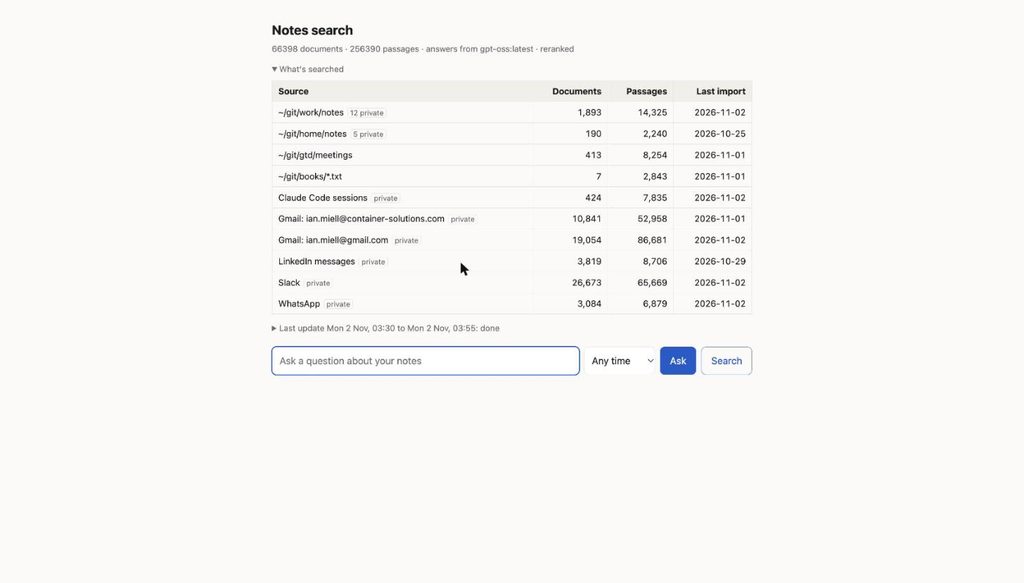
The front page: each source with its documents, passages and last import
Everything tagged ‘private’ gets special treatment, which I’ll come to below.
You type a question and either hit ‘Search’ (just give me the passages) or ‘Ask’ (have a model write an answer from them, with [n] citations). Here’s the xrandr question mentioned above:
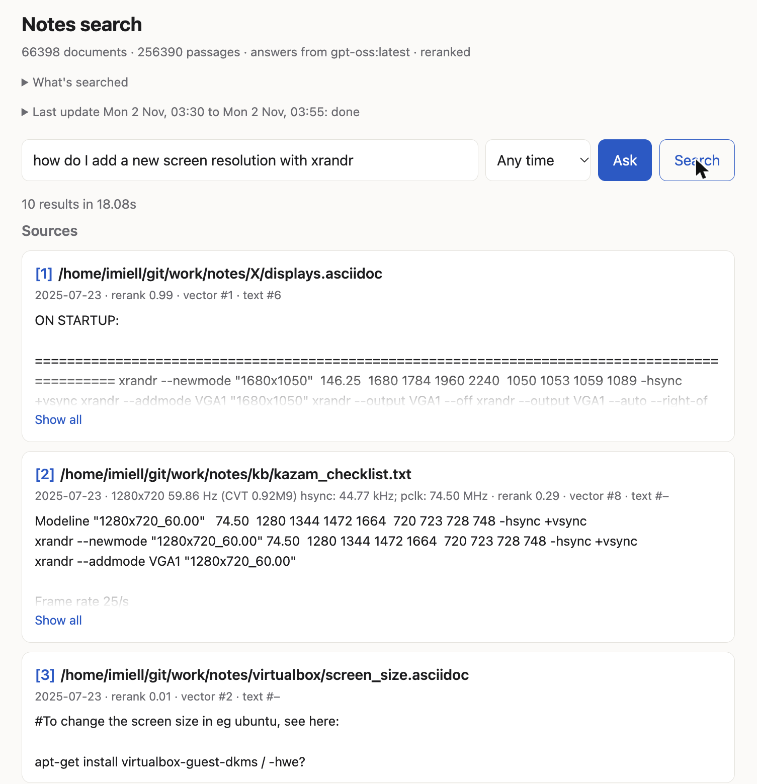
Searching for the xrandr note. The top hit is the right one
The top hit is the right note. Each result shows where it ranked in each of the two searches (‘vector #1 · text #6’) and the reranker’s score (0.99). I left these in the page because they help me see why something did or didn’t come back.
The Stack
Here’s the architecture:
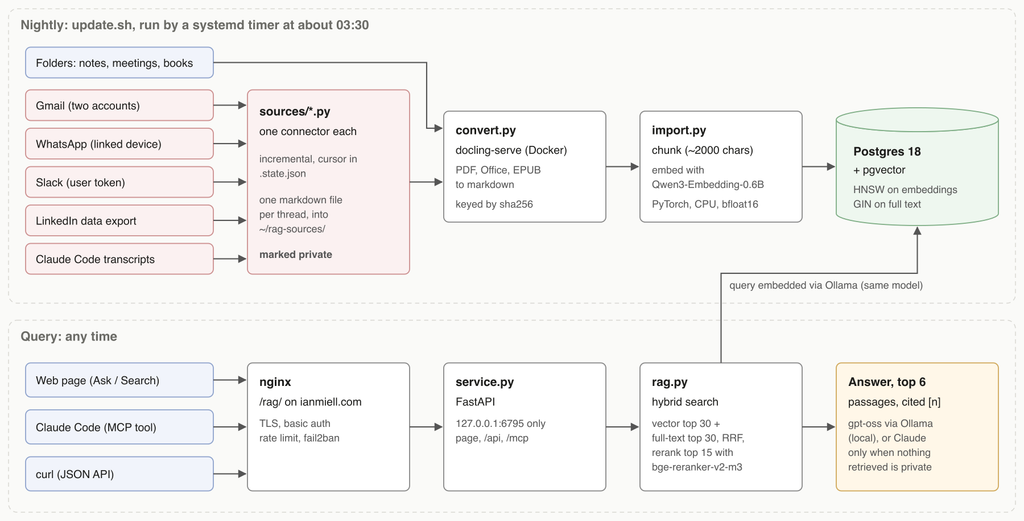
Architecture. Nightly ingest above, queries below.
Going through it from top left:
- Connectors (
sources/*.py): one small script per source. Each fetches only what’s new since last time, keeps its cursor in a.state.json, and writes one markdown file per conversation thread into~/rag-sources/. Gmail uses the API, WhatsApp uses whatsmeow as a linked device, Slack uses my own user token, and LinkedIn has no messaging API at all, so it parses the data export you can request. - Conversion: docling-serve, running in Docker, turns PDFs, Office files and EPUBs into markdown.
convert.pykeys everything by the file’s SHA-256, so unchanged files are skipped, and a copy of a file in two places is converted once. - Chunking and embedding:
import.pysplits each document on headings into chunks of about 2,000 characters, keeping code blocks whole where it can, and embeds each one with Qwen3-Embedding-0.6B. - Storage: Postgres 18 with
pgvector. An HNSW index on the embeddings, and a GIN index on a generatedtsvectorfor plain old full-text search. No vector database (I already had Postgres, and I didn’t want another thing to look after). - Retrieval (
rag.py): the top 30 by vector similarity and the top 30 by full-text search, merged with ‘reciprocal rank fusion’, and then the top 15 reordered by a cross-encoder reranker (bge-reranker-v2-m3). - Answers: the top six passages go to
gpt-ossrunning locally in Ollama, or to Claude if nothing in them is private. - Interfaces:
service.pyis a single FastAPI app with the web page, a JSON API and an MCP endpoint, so Claude Code can search my notes as a tool. There’s alsosearch.pyfor the command line.
A systemd timer runs update.sh every night: connectors, then conversion, then import. This morning’s run took 25 minutes, and the page shows how far it got:
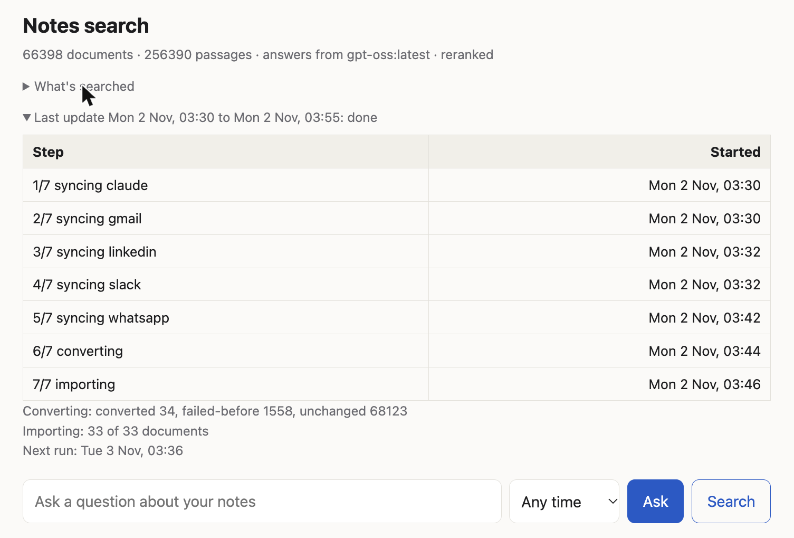
The latest nightly run, step by step
The Python is all uv scripts: each file lists its own dependencies in a comment block at the top, and uv builds the environment the first time you run it. There’s no virtualenv, no requirements.txt, no pyproject.toml. I can’t overstate how much faff that saves on a one-person project.
Lessons Learned
1) Hybrid Search Earns Its Keep
I’d half expected vector search to be enough. It isn’t.
My notes are full of commands, flags, error strings and hostnames. Embeddings are good at ‘what does this mean’ and surprisingly bad at ‘find me this exact token’. Full-text search is the opposite. In the xrandr example above the right note was #1 in the vector search but only #6 in full text, and the second-best result didn’t show up in the full-text list at all. On other queries (an error message, a person’s name) it’s the other way round.
Merging the two ranked lists is a few lines of SQL and Python. If you’re building one of these, do both from day one.
2) The Reranker Is the Slow Part, and Worth It
A search on its own takes about 0.6 seconds. The reranker adds around 15 seconds on a busy box (the search above took 18). That’s a lot, and I can turn it off with RAG_RERANK=0.
I leave it on. The difference in the top three results is big enough that waiting is better than scrolling.
3) On a CPU, How You Run the Model Matters More Than Which Model
I started by embedding through Ollama, since it was already there. It was going to take days.
Running the same model directly in PyTorch, in bfloat16 on 12 threads, was about nine times faster: roughly 2-3 chunks a second. Still not quick (the full notes were about 76,000 chunks, so the first import took hours), but tolerable for an overnight job.
There’s a gotcha hiding in that, though. Queries are still embedded through Ollama (it’s already loaded and it’s fast for one sentence), while documents are embedded in PyTorch. They have to be the same model, or the vectors are meaningless against each other. That’s now written in big letters in the repo’s notes for future me (and for the coding agents).
4) Decide What Not to Index
My first conversion produced about 76,000 chunks of data. Thirty-three vendor-manual PDFs accounted for about 35,000 of them, and other useless old CSVs another 16,800.
All of that is noise. CSVs chunk into meaningless fragments of numbers, and the manuals are public, online and big enough to crowd my own notes out of the results. So there’s an exclude.txt of glob patterns, grouped into tiers, with chunk counts against each so I could see what I was trading off.
Similarly, the Gmail connector only takes threads with people I’ve actually replied or written to. That one rule throws away the newsletters, receipts and spam without me having to write a single filter.
5) Build for the Rerun
Everything is incremental and resumable. Conversion is keyed by content hash and records failures in a sidecar file (there are 1,558 of them, mostly files docling can’t handle, which it skips until I ask it to retry). The import commits each document on its own. The Gmail and Slack connectors checkpoint every minute, so a first sync of a big mailbox that falls over halfway resumes rather than starts again.
A run with nothing new takes a few seconds.
6) Alert on Failure
Similarly, alert.py emails me when a run fails, and also when a source has quietly stopped: no WhatsApp messages for three days (the phone has probably unlinked the bridge), a Slack workspace that hasn’t synced (usually a revoked token), or a LinkedIn export over a month old. Silent staleness is the failure mode of anything that runs at 3am.
7) Dates Are Harder Than They Look
I wanted to ask ‘what was I doing last month?’. That needs a date for each document, and the obvious one, the file’s modification time, is often useless. My notes folder was copied in bulk on 23 July 2025, so as far as the filesystem is concerned every note I’ve ever written dates from that afternoon (which you can see in the search screenshot above).
Messages are better: the connectors write the first and last message dates into the markdown front matter, and an email attachment takes its thread’s dates. Everything else gets the file time, with that caveat.
8) The APIs Have Opinions
Each connector taught me something about the vendor:
- Gmail: to use the API with OAuth, Google’s consent screen wants links to a home page, a privacy policy and terms of service. For an app with exactly one user. So there are now three static pages on my website explaining, very formally, that I won’t sell my own data to myself.
- Slack: an app you distribute is limited to one history request a minute. An internal, undistributed app gets about 50.
- WhatsApp: there’s no official API for your own account, so the bridge is unofficial and acts as a linked device. There’s a small risk WhatsApp objects. If it doesn’t connect for about two weeks the phone unlinks it, hence the alert.
- LinkedIn: no API at all. You request a copy of your data, wait a day or so, and drop the zip in a folder.
Security
Here’s what’s between the internet and the data:
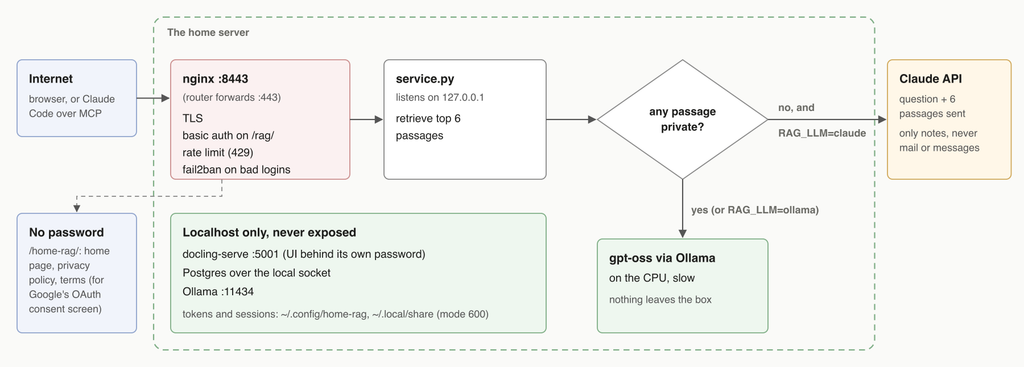
The request path, and where private data may and may not go.
- One door. The service listens on
127.0.0.1only. The only way in from outside is nginx, which terminates TLS, asks for a password on/rag/, rate-limits requests and has a fail2ban jail for repeated bad logins. docling, Postgres and Ollama are all on localhost and never exposed. - Secrets stay out of the repo. OAuth tokens, the Slack token and the WhatsApp session live under
~/.config/home-ragand~/.local/share/home-rag, mode 600. The converted text is gitignored. The Claude Code connector replaces anything that looks like a token with[REDACTED]before it’s indexed. - Private data is answered locally. Anything from the connectors (mail, messages, transcripts) is flagged
privatein the database, as is any note withprivate: truein its front matter. If any of the six passages retrieved for a question is private, the answer comes from the local model, even when the service is configured to use Claude. Claude only ever sees questions answered entirely from my non-private notes, and when it does, it gets the question and those six passages, nothing else. - The status page shows counts, not names. The ‘last update’ panel reads the systemd journal, which lists every file converted. The page only shows step names and totals.
Was It Worth It?
In addition to being able to find stuff I wouldn’t have been able to find before, I’ve found that collating all this information has had a few secondary benefits already.
One of the things I like to do is look back on what I’ve done over the last month/quarter/year as a kind of review process. Having this data in one place makes it trivial, as I can just interrogate the data, summarise it and pass it through a local model. It takes a while, but the task can be done asynchronously. As time goes on I am sure I will find more use cases for it.
I’m curious whether other people are doing similar things, and if so, how they differ. Let me know!

If you feel this was useful, consider buying me a coffee to say thanks!